A tagline in WordPress is a short, descriptive phrase that helps visitors quickly understand your website’s focus. A well-written tagline reinforces your brand identity, aids SEO and also ensures you stand out from the default, which is “Just another WordPress site.”
Table of contents
What’s the tagline?
In WordPress, a tagline is a short, descriptive phrase that accompanies your website’s title. It often appears near or beneath the site title in your header, depending on your theme.
For example, if your site is about travel, your tagline might be something like “Adventures across the globe.” While not always mandatory, a well-crafted tagline can help communicate your brand’s essence to visitors at a glance.
Why is setting your tagline important?
By default, WordPress sets the tagline to “Just another WordPress site”, but you can—and should—update it to reflect your site’s purpose or identity. Your tagline can be used in many places on your site. The most common occurrences are:
- In the header of your website,
- In your site’s schema markup,
- In your site’s RSS feed.
Setting a unique tagline helps you to stand out from the competition. And that’s why we’ve added the check to Progress Planner.
How to set your tagline in WordPress?
There are several ways to set the tagline in WordPress. For example through the WordPress settings, through WordPress’ site editor, and through various plugins like Yoast SEO.
The easiest way to set it is by going to ‘Settings > General’ within the WordPress admin dashboard of your site.
Steps
- Login on your WordPress website and navigate to the dashboard
Typically you can do this on yourdomain.com/wp-admin/. - Click on or hover over Settings
- Click on General
This takes you to the page where you can set your tagline.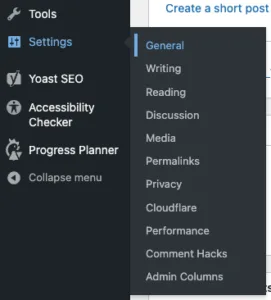
Screenshot of the WordPress menu Settings > General. - Enter your unique tagline
Make sure you enter a unique description of your site to stand out from your competition.

- Click Save
Don’t forget to save your change!
Why is this in Progress Planner?
Ravi’s recommendations help you create the best possible site. Setting a unique tagline helps you to stand out from the competition, who oftentimes fail to make this change. Progress Planner adds the this check to make sure that you’re representing your site in the best way possible!